The all-in-one student workspace that makes every slide exam-ready.
Upload your lectures once. Quizard writes exam-style questions and flashcards that cite the slide, maps what you have not covered, tutors you on the page you are stuck on, and builds a 15-minute session every day. Your whole semester, in one place.
Your exam date does not move. Every slide you have not practised is a question you might miss. See your gaps in five minutes, before you create an account.
- No account to start
- Free to study your own material
- Export to Anki any time
Which irrigant removes the inorganic part of the smear layer?
Keep reading where you read. Send it to Quizard from:
- Goodnotes
- Notability
- Google Drive
- Dropbox
- OneDrive
- Notion
- Canvas calendar
- Anki
- Claude
Used by 10,000+ students from










Everything for your semester, in one place.
Stop juggling a notes app, a flashcard app, a planner and an AI chat. Quizard keeps your lectures and the practice built from them together.
- Courses and lectures Every file, note and recording for a class lives under its course, with the exam date attached. Learn more
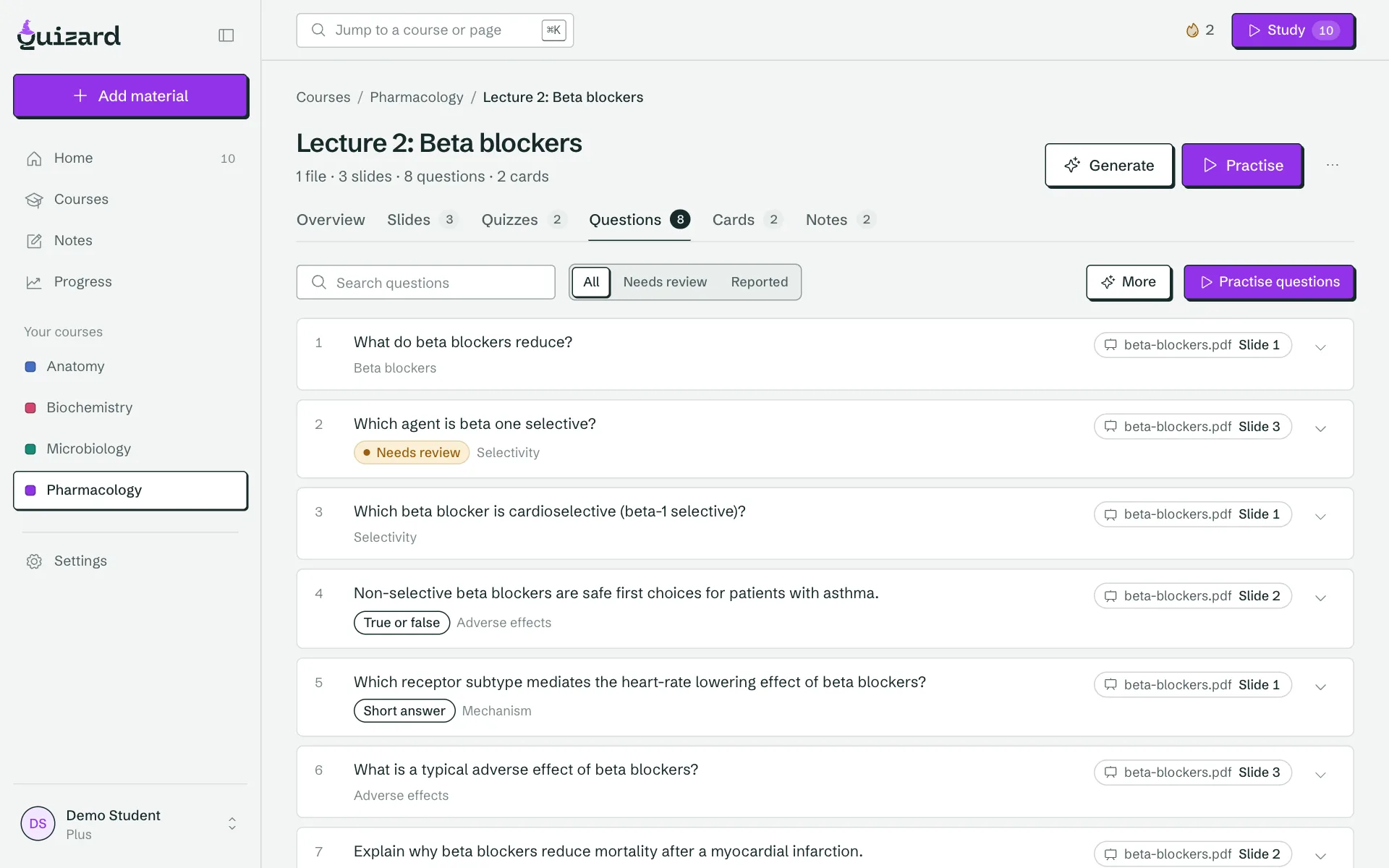
- Questions and cards that cite the slide Exam-style questions, vignettes and flashcards, each linked to the slide it came from. Learn more
- Slide map See every slide as practised, weak or not yet covered, so nothing surprises you in the exam. Learn more
- Daily 15-minute session Due cards, re-quizzes and weak topics in one short session that never stops halfway. Learn more
- Slide tutor and highlights Ask about the slide you are on and get answers from your own files. Highlight a passage to practise it. Learn more
- Integrations and Claude or ChatGPT Bring files in from email, Drive, Dropbox, OneDrive and Notion, and study from your AI assistant through MCP. Learn more
Stop copying slides into ChatGPT, then Anki.
Most students already do this by hand: export the slides, paste them into an AI tool, copy the output into a deck, then review. Quizard collapses that into one step.
Today
5 steps, 4 apps- 1Export the lecture slides to PDF
- 2Paste them into ChatGPT or NotebookLM
- 3Copy the answers into a Google Doc
- 4Paste them into Anki or Quizlet
- 5Hope it covered what the exam will test
With Quizard
Upload once- Add the lectureA PDF, slides, a note or a recording, from any app.
- Practise questions that cite the slideCheck any question against its source in one tap.
- See what you have coveredEvery slide marked practised, weak or not yet.
- Do 15 minutes a dayDue cards, re-quizzes and weak topics, planned to your exam date.
Every question shows its slide.
AI study tools lose students when the answer key is wrong or the questions are shallow. Quizard keeps the source one tap away, and gives you the controls to fix what is off.
- Open the slide and the sentence a question came from.
- Five-option exam formats, clinical vignettes and quizzes mixed across topics.
- Verbatim mode copies your wording instead of paraphrasing it.
- Edit any item, or report a bad question in two taps.
A 34-year-old presents with lingering pain to cold on a mandibular molar and pain on biting. Pulp testing shows a delayed response. What is the most likely diagnosis?
Symptomatic irreversible pulpitis
Irreversible pulpitis: lingering pain to thermal stimuli, spontaneous pain and delayed response on pulp testing.
Did you cover slide 42? Quizard knows.
When your school writes the exam, no ready-made deck covers your professor’s details. The map shows every slide in every lecture, so you stop wondering what you missed and spend the last week on what is left.
- Practised, weak or not yet, for every slide.
- Weak topics surface automatically for re-quizzing.
- Exam dates per course, so coverage counts down to the day.
Fifteen minutes. Easy to start.
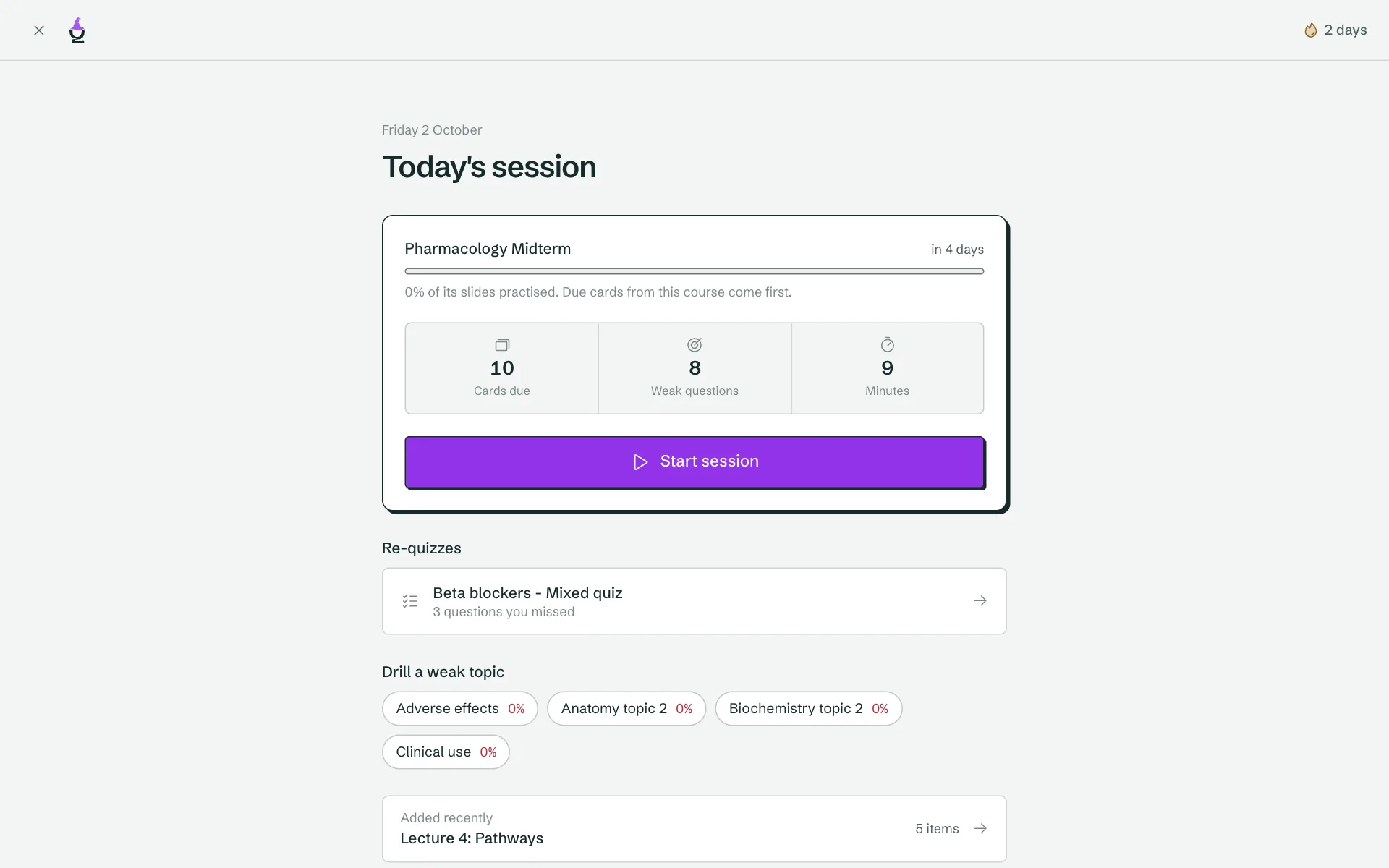
Getting started is the hard part, so we make the barrier low. Open Quizard and today’s session is already built: due cards, recent lectures and the topics you are weakest on.
Bring the material to Quizard. Don’t change how you read.
Students read in Goodnotes, Notability or on paper, keep files in Drive and group chats, and study with ChatGPT and Anki. Quizard is where all of it lands and turns into practice.
Bring it in
- Email-inForward any PDF to your private address.
- Share menu and Apple ShortcutSend files from your phone or iPad.
- Drive, Dropbox, OneDrive, NotionPick the files and pages to import.
- Browser extensionSave a course page or PDF in one click.
- RecordingsUpload a lecture recording as a lecture.
Stay on schedule
- Course calendarsPaste a Canvas, Moodle or Brightspace link. You confirm which events are exams.
- Your Quizard calendarSubscribe in Google, Apple or Outlook to see exams and your daily session.
- RemindersEmail, push and Discord that name your course.
Take it with you
- Anki and CSV exportFree on every plan.
- Anki and Quizlet importBring the decks you already built.
- Class sharingShare a course with a private invite link.
Keep studying in your AI assistant, with Quizard as the memory.
Connect Quizard to Claude or another compatible assistant. What you make in a chat is saved to the right course, linked to the slide and scheduled for review. Your assistant can also read your progress and quiz you on weak topics.
Free for your own material, like everything else you study.
Built for classes where your school writes the exam.
Dentistry, pharmacy, nursing, PA and medical students often get tested on their own professors’ slides, where no ready-made deck exists. That is exactly where Quizard helps most. It works for any subject you have lecture material for.
- Dentistry
- Pharmacy
- Nursing and PA
- Medicine
- Any university course
- Your own notes and papers
Fair by design.
Studying what you made is free
Study, review and daily sessions are unlimited on every plan. Limits apply only when you start generating, never halfway through a session.
Your cards are yours
Export to Anki or CSV on any plan, whenever you like. No lock-in, and you can import your existing Anki decks too.
Questions you can check
Wrong answer key or sloppy question? Edit it, switch on verbatim mode, or report it. Every question links back to the slide it came from.
Nothing stops mid-session
No hearts, no credits, no lockouts. Visible progress and reminders that name your course keep you coming back instead.
Free to study. Pay when you generate more.
No hearts, no lockouts. Studying and exporting your own material is free on every plan.
Free
Everything you need to study your own slides.
$0forever
- Study, review and daily sessions, unlimited
- Questions and cards that cite their slide
- AI generation for 50 slides a month
- 500 MB of slides
- Slide tutor: 30 questions a day
- Export to Anki and CSV, always
- Connect Claude or ChatGPT
Plus
For a full semester of lectures.
$7.99/month
$39.99/year
7-day free trial. Cancel any time before it ends.
- Everything in Free
- AI generation for 3,000 slides a month
- 5 GB of slides
- The slide map: every slide, practised or weak
- Clinical vignettes and mixed exam quizzes
- Slide tutor: 300 questions a day
- Lecture recordings: 40 a month
Exam pass
Plus for the run-up to one exam.
$9.99once
- Plus for 30 days
- Pay once, it never renews
- Made for the weeks before an exam
- Nothing ever stops a session halfway. Limits apply only when you start generating.
- Your cards are yours: export them to Anki or CSV on any plan.
- Change or cancel your plan yourself from the billing page.
How to study from lecture slides and actually remember them.
Rereading slides feels productive but barely works. These are the methods that do, and how Quizard builds each one in.
Test yourself instead of rereading
Active recall means pulling an answer out of memory instead of looking at it again. Research on the testing effect shows that being quizzed on material beats rereading it for long-term retention, even when the quiz feels harder. Quizard turns every lecture into questions and flashcards so retrieval practice is the default way you study, not an extra step.
Space your reviews
Spaced repetition revisits a fact just before you would forget it, with the gap growing each time you get it right. It is the engine behind Anki and the reason a few minutes a day beats an all-night cram. Your daily session schedules due cards automatically, and you can export everything to Anki if you prefer it. See our Anki to PDF tool for printable decks.
Know what you have not covered
The most common exam surprise is a slide you never practised. When your school writes the exam, no public deck covers your professor’s details, so coverage is on you. The slide map shows every slide as practised, weak or not yet covered, so you spend the last week on the gaps, not on what you already know.
Mix topics, and check your sources
Interleaving, switching between topics in one session, builds the skill of choosing the right method, which is what exams test. Quizard can mix questions across lectures. And because AI can be wrong, every question shows the slide it came from, so you can verify it, edit it or report it.
Keep sessions short and consistent
Starting is the hardest part of studying. A fifteen minute session you actually do beats a three hour plan you skip. Pair it with the free Pomodoro timer and our study guides for exam-specific plans.
Questions students ask
What is Quizard?
Quizard is the practice layer for your own lecture material. You upload slides, notes or recordings, and it writes exam-style questions and flashcards from them. Every item links to the slide it came from, you can see which slides you have not practised, and a short daily session keeps you on track for your exam.
Do I need an account to try it?
No. You can start with a free diagnostic: answer a few questions, take a real generated quiz, and see where you stand. We only ask you to create an account when you want to save it.
Does Quizard replace Goodnotes, Notability or my notes?
No, and it is not trying to. Keep reading and annotating wherever you do today, by hand or on your iPad. Send the slides to Quizard by email, the share menu, Drive, Dropbox, OneDrive or Notion, and practise there.
How do I know the questions are correct?
Every question and flashcard shows the slide it came from, so you can check it against the source in one tap. You can edit any item, use verbatim mode to copy your wording instead of paraphrasing, and report a bad question when you spot one.
Is it really free?
Yes. On the free plan you can study, review and run daily sessions without limit, and generate questions and cards from 50 slides a month. Plus raises that to 3,000 slides a month and adds the slide map and clinical vignettes. There is also a one-off exam pass for the weeks before an exam.
Can I use Quizard with ChatGPT or Claude?
Yes. Quizard has an MCP server, so you can connect it to Claude and other compatible assistants. Ask for cards on a lecture and they are saved to the right course, linked to the slide and scheduled for review. Your assistant can also read your weak topics and quiz you on them.
Which exams and subjects does it work for?
Any subject, because it works from your own material. That makes it a good fit for classes where your school writes the exam, such as dentistry, pharmacy, nursing, PA and medicine. You can also upload past papers, textbook chapters or your own notes.
What is an all-in-one student workspace?
It means everything you do to prepare for an exam lives in one place: your courses and lectures, the files behind them, questions and flashcards written from those files, notes, a map of what you have covered, a daily session, a tutor for the slide you are stuck on, and reminders. You stop juggling a notes app, a flashcard app, a planner and an AI chat.
How is Quizard different from ChatGPT or NotebookLM?
General AI chats forget your course between sessions and cannot show you what you have not covered. Quizard keeps your lectures, schedules reviews with spaced repetition, links every question to its slide, and tracks coverage per slide. You can still use ChatGPT or Claude: connect them through the Quizard MCP server and they save cards and quizzes straight into your course.
What file types can I upload?
PDF, PowerPoint (PPTX), Word (DOCX), plain text and Markdown files, plus lecture recordings that are transcribed into a lecture. You can also send material by email, from your phone’s share menu, or import it from Google Drive, Dropbox, OneDrive and Notion.
Does Quizard use spaced repetition?
Yes. Cards you have studied come back in your daily session at intervals based on how well you remembered them, and questions you missed return as re-quizzes. You rate your recall after each card and Quizard schedules the next review.
Is Quizard available on mobile and desktop?
Quizard works in any modern browser on phone, tablet and laptop, and there are desktop apps for Mac and Windows. Your courses and progress are the same everywhere.
Who can see what I upload?
Your uploads are private to your account. If you want to study with a class, you can share a course with a private invite link and revoke it whenever you like.
Did you cover slide 42?
Take the free diagnostic and see where you stand. No account, no card.